首页 > 教程资讯 > 教程详情

win10系统steam错误代码-111怎么办?win10系统steam错误代码-111的解决设置教程

教程文章 半城烟雨 2020-11-10
文章分享

很多玩家都在steam这个平台上玩游戏,有所以难免会遇见steam错误代码-111的情况,win10系统steam错误代码-111怎么办呢?其实这是简单的网络设置出了问题,只要取消局域网设置就可以了,今天小编教你们win10系统steam错误代码-111的解决设置教程。

win10系统steam错误代码-111怎么办

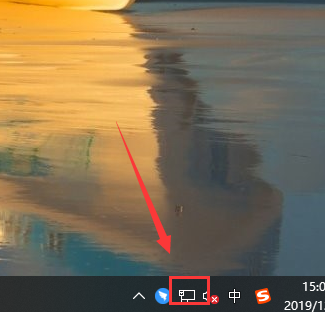
1、点击网络连接。

win10系统steam错误代码-111怎么办?win10系统steam错误代码-111的解决设置教程

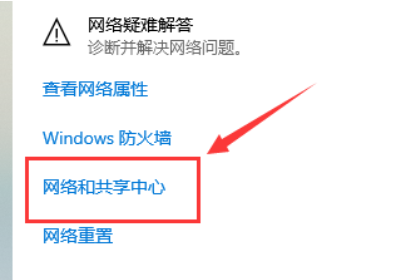
2、打开网络和共享中心。

win10系统steam错误代码-111怎么办?win10系统steam错误代码-111的解决设置教程(1)

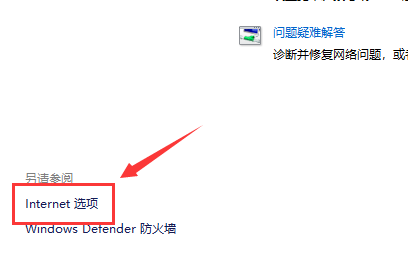
3、选择下面Internet选项

win10系统steam错误代码-111怎么办?win10系统steam错误代码-111的解决设置教程(2)

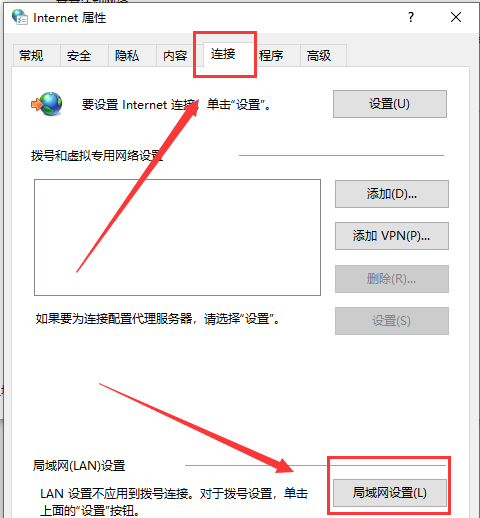
4、选择连接,点击局域网设置

win10系统steam错误代码-111怎么办?win10系统steam错误代码-111的解决设置教程(3)

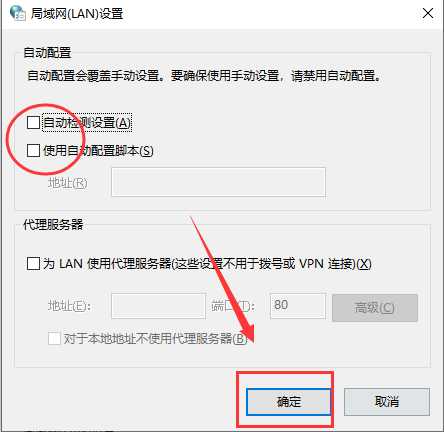
5、把勾勾都取消,确定就可以了。

win10系统steam错误代码-111怎么办?win10系统steam错误代码-111的解决设置教程(4)